
Instagram is full of informative carousel posts. Each image might contain part of a tutorial, a checklist, study notes, a recipe, a collection of tools, or a concise explanation of a topic.
They're easy to browse, but much harder to work with afterward. Since the text is embedded in images, you can't simply highlight and copy it. Most people end up saving the post, taking screenshots, typing the information manually, or leaving it in their Saved collection hoping they'll find it again later.
Here's the easiest way to turn an Instagram carousel into editable text.
Why You Can't Simply Copy Text from an Instagram Carousel
An Instagram post can contain two different kinds of text:
- the caption written below the post
- text that's part of the images themselves
The caption can sometimes be copied in a web browser or with built-in phone features.
Text inside the images is different. Instagram treats it as part of the picture, not as selectable text.
Even if an image contains clearly readable headings, bullet points, or entire paragraphs, you can't simply select them with your finger and copy them.
The problem becomes even more noticeable with carousel posts. Instead of one image, the information is spread across multiple images that have to be opened, saved, and processed one by one.
Taking Screenshots and Using OCR on Your Phone
The most obvious approach is to take a screenshot of every image and use your phone's built-in text recognition.
On iPhone, you can use Live Text.
On Android, you can use Google Lens or your phone's built-in gallery features.
You can learn more about this approach in our guide:
How to Copy Text from an Image on Android and iPhone
Why This Gets Tedious for Carousel Posts
If you're only copying a sentence from a single image, your phone's built-in tools work perfectly well.
But when a carousel contains 5, 10, or even 20 images, the process quickly becomes repetitive:
- Open each image
- Take a screenshot
- Open your Photos app
- Run text recognition
- Copy the extracted text
- Paste it into your notes or document
- Repeat everything for the next image
Once you've finished, you still need to put all the text back together in the correct order and make sure nothing is missing.
In other words, you're manually turning a collection of images into a single document — something that can be automated.
Sending the Instagram Post to a Telegram Bot
If you want the text from every image at once, you can useImgTxtApp, a Telegram bot for extracting text from images.
Instead of taking screenshots one by one, simply send the bot a link to the Instagram post.
How to Send an Instagram Post to the Telegram Bot
- Open the Instagram post
- Tap Share
- Choose Telegram
- Select ImgTxtApp
- Tap Send
ImgTxtApp automatically downloads every image in the carousel, extracts the text from each one, and returns all the extracted text as a single editable document.
Getting the Caption as Well as the Slides
The caption below a post often carries the part that matters most: the full recipe when the slides only show the steps, the source links, the disclaimer, the list of tools mentioned in the images. Because you send the bot a link to the post rather than screenshots, the caption arrives with it instead of having to be selected and copied separately in the app.
This is the part that screenshots cannot reach at all. A screenshot captures only what fits on screen, so a long caption gets cut off mid-sentence and has to be scrolled and captured again. Working from the link keeps the caption and the text from every slide together in one place, in the order they appeared.
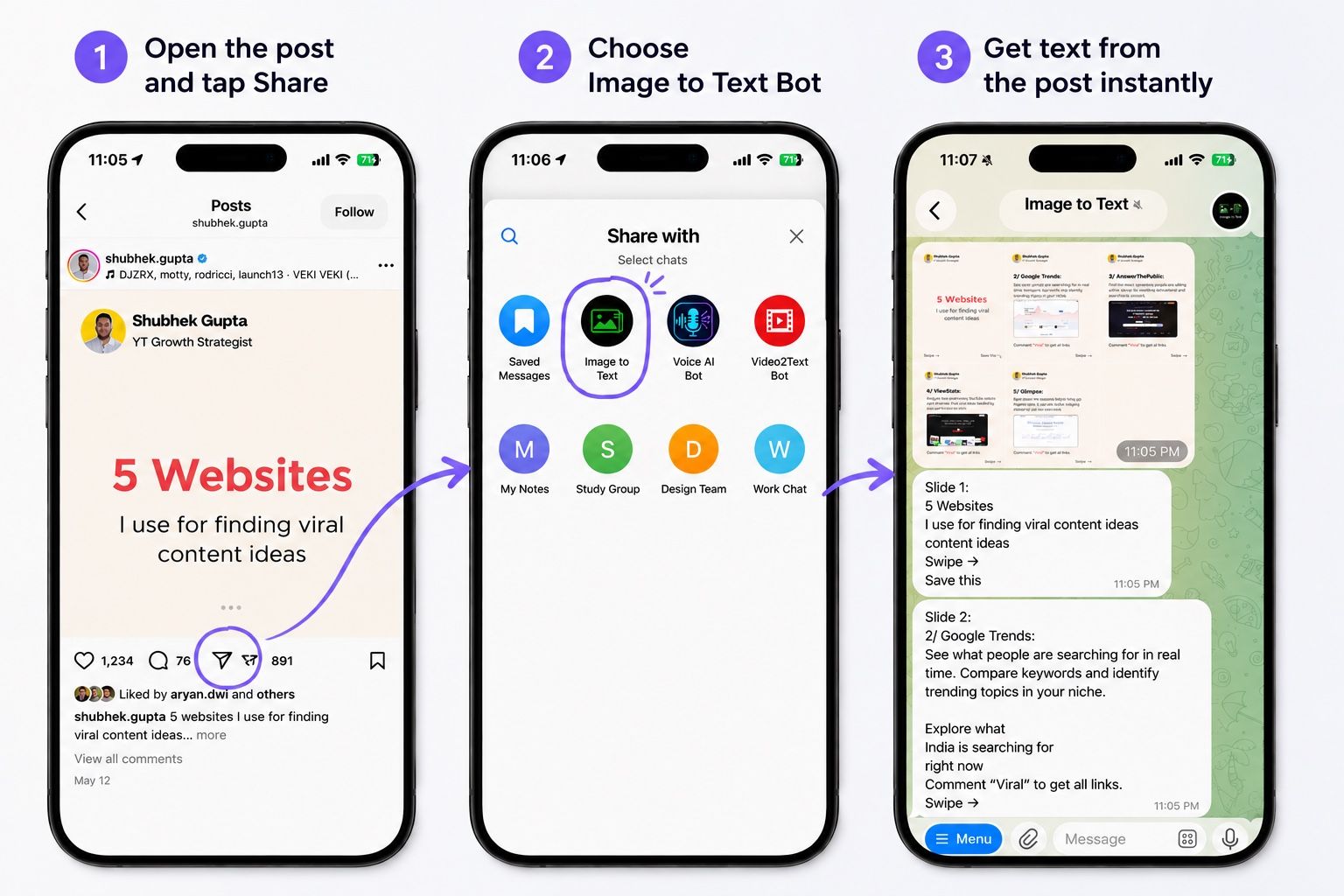
Unlike your phone's built-in tools, you don't have to process every image individually. ImgTxtApp extracts text from every image and combines everything into a single document automatically.
That means you don't have to:
- save every image separately
- take multiple screenshots
- run OCR on each image
- copy each text fragment manually
- combine everything into one document yourself
This approach works especially well for educational carousels, tutorials, checklists, collections of tools, and other posts where most of the information is inside the images.Learn more about ImgTxtApp
What Is an Instagram Carousel?
A post with multiple images is commonly called an Instagram carousel, or simply a carousel.
You swipe through the images from left to right, with the first image usually serving as the title and the following images containing the main content.
Carousel posts often include:
- step-by-step tutorials
- lists of common mistakes
- collections of tips
- article summaries
- educational content
- marketing breakdowns
- book, movie, or tool recommendations
- recipes
- stories split across multiple images
Some people may not be familiar with the term carousel, but it's simply an Instagram post that contains multiple images instead of just one.
When extracting text from a carousel, it's important to preserve the order of the images. Processing each image separately makes it easy to mix up sections and lose the flow of the original content.
That's why it's much more convenient to use a tool that processes the entire carousel in one go.
What Types of Instagram Posts Benefit Most?
Text extraction is especially useful for posts where the images contain most of the valuable information.
For example:
- educational posts
- tutorials
- checklists
- collections of apps and tools
- recipes
- study notes
- recommendation lists
- marketing breakdowns
- book and movie recommendations
- quote collections and key takeaways
Many people save these posts on Instagram but rarely revisit them. After you've accumulated dozens of saved posts, finding a specific idea becomes difficult, and Instagram can't search the text inside images.
Once the text has been extracted, it becomes fully searchable and can be saved in your notes, documents, or pasted into AI assistants like ChatGPT, Claude, or Gemini.
Which Method Should You Choose?
Let's compare the built-in smartphone features with ImgTxtApp, a Telegram bot for extracting text from images.
The built-in features on iPhone and Android are a good choice if you only need to copy a sentence or two from a single image.
If you want the complete text from an Instagram carousel, sending the post to ImgTxtApp is usually much faster. It reduces the number of steps and removes the need to process every image manually.
The biggest difference isn't OCR quality. It's the workflow.
With your phone's built-in tools, you work with each image individually.
With ImgTxtApp, the entire carousel is processed as a single document.
If you regularly save educational carousels, checklists, or tutorials on Instagram, sending the post to ImgTxtApp is often the quickest way to turn the entire carousel into editable text.
Try It Yourself
Your first 2 text extractions are free.
Open ImgTxtApp in Telegram, send an Instagram carousel, and receive all the text from every image in just a few seconds.